
Tech
How to craft Diablo 4 Lord of Hatred Infinite Zenith Paladin Build? | IGGM strongly recommends equipping Mythic Items!


Although the newer Warlock class has been stealing the spotlight, that doesn’t mean the Paladin has nothing to offer in Diablo 4 Lord of Hatred. On the contrary, the new environment allows for the development of even more diverse playstyles.
For this guide, IGGM has developed Infinite Zenith Paladin, a currently unconventional build based on Zealot Oath Paladin path. If you’re interested, read on for the detailed crafting strategy!
Infinite Zenith Paladin Build Overview
First and foremost, utilizing this build requires precise positioning and angling during combat to ensure that your slashes and sweeps land within the intended target zones.
To achieve this, you must utilize attack-move commands to maintain your combat rhythm. If your swing, triggered by Zenith skill, doesn’t directly strike an enemy, you must at least ensure that the resulting echo hits your target.
Although the build’s name includes the word infinite, you cannot, in theory, truly spam Zenith indefinitely. However, during cooldown windows, you can maintain the necessary buffs to keep the skill cycle running by swinging your sword at the air while simultaneously using Evade to reposition.
Achieving this objective requires not only generating echoes but also leveraging the 30% Cooldown Reduction provided by Relentless Paragon node.
This effect activates whenever you move at least once every 2 seconds; furthermore, it provides a massive multiplier bonus to your damage output.
With this foundational setup in place, you will enjoy extremely high attack speed and cast speed. However, unlocking the build’s full potential places demanding requirements on both your mechanical execution and your gear.
To streamline your gameplay and avoid the endless grind for specific affixes, you can choose to buy Diablo 4 items with fast delivery from IGGM. This ensures you can finalize your gear build with maximum efficiency and jump into the fray as quickly as possible!

Skills and upgrade setup
One of the primary reasons this is considered an unconventional build is that it foregoes the use of any basic attack skills. Your first priority should be to max out Fanaticism Aura to boost your critical hit damage multiplier.
Since this unconventional skill allocation skips over basic skills, your reliance on high-tier gear and Masterworking is absolutely critical. Furthermore, optimizing your Fanaticism Aura requires a substantial amount of materials and gold; having sufficient Diablo 4 gold for sale allows you to repeatedly reset your Masterworking tiers until you achieve the perfect Critical Damage multiplier.
Next, you should invest in Defiance Aura to maximize your health and effectiveness, and select Rite of Might upgrade to further boost your damage multiplier via the Resolve mechanic.
Subsequently, unlocking Stay Resolute helps you stack Resolve layers. Since the Defiance Aura grants a damage bonus for every layer of Resolve you possess, this creates a highly synergistic effect.
Upgrading Falling Star to its maximum level grants you the Vulnerable effect; Fanatic Descent transforms Falling Star into a Zealot skill while simultaneously debuffing enemies.
As for Rally skill, investing just a single point is enough to boost your critical hit chance and provide a 30% damage reduction. Furthermore, it is automatically triggered by your seals.
If you unlock the 3-piece set bonus for your Cathan’s Dauntless Faith charm set, Do or Die effect will automatically trigger Rally every 6 seconds once its stacks reach their maximum limit.
The final Ultimate skill, and indeed the very core of Infinite Zenith Paladin build, is, naturally, a fully upgraded Zenith. It grants both increased critical hit chance and the unstoppable status.
Additionally, if you unlock Sermon of Steel Major Upgrade for this skill, you will continuously channel Zenith for 4 seconds before the cooldown period begins.
Regarding your choice of Oath, Zealot Oath is the undisputed choice. It empowers specific skills, granting additional effects with every stack of your buffs and triggering an echo effect whenever a skill lands a critical hit.
Talisman effects explained
As mentioned in the skill selection section, Cathan’s Dauntless Faith is the preferred charm set, primarily sought after for the stat bonuses provided by its 2-piece set bonus.
The 2-piece bonus allows you to accumulate Do or Die stacks by using Zealot skills. This buff not only provides a multiplicative bonus to your Critical Hit Damage but also grants a casting speed bonus that can stack up to 25 times.
We have already covered the effects of the 3-piece set bonus; however, upon completing the full 5-piece set, the collection grants your Zealot skills a massive multiplicative damage bonus of up to 200%.
Furthermore, the echo effects generated by your accumulated Do or Die stacks are unleashed whenever you move, automatically replicating the skills you previously cast, this is precisely why IGGM emphasized at the outset that you must remain in constant motion throughout the entire battle.
Which gear effects pair best?
For this specific build, certain Diablo 4 Mythic items are indispensable, such as the Heir of Perdition helm, which boosts your Critical Hit Chance, and Tyrael’s Might armor, which significantly enhances your survivability.
When equipping your gloves, do not forget to pair them with Aspect of Utmost Glory. This Aspect not only allows you to deal increased skill damage while in a Healthy state, but its effects are also doubled against Weakened enemies.
For your boots, you should pair this with Wildbolt Aspect to pull distant enemies toward you and boost the damage dealt to them.
However, applying this Aspect to your Amulet yields even better results, as it frees up your boot slot to accommodate a different Aspect.
For your weapon, be sure to equip an option featuring Crushing Aspect; this ensures you maintain a Fortified state, thereby securing the corresponding bonus damage buff.
If you can also imprint Revelator’s Aspect onto your weapon, you will further amplify the damage output of your Zealot skills.
Additionally, do not forget to ensure that your rings feature Aspect of Jacques’ Fervor. With this, your critical strike damage increases with every stack of Fervor you accumulate, and this damage boost has no upper limit!
In summary, Infinite Zenith Paladin build proves that – with the right combination – traditional classes can indeed rival high-profile newcomers like Warlock. By mastering the rhythm of combat, you can transform Paladin from a resilient tank into an unstoppable whirlwind of frenzied energy. Equip your Mythic items, refine your Oath, and prove to Lord of Hatred in Diablo 4 that the light of Paladin will never be extinguished!

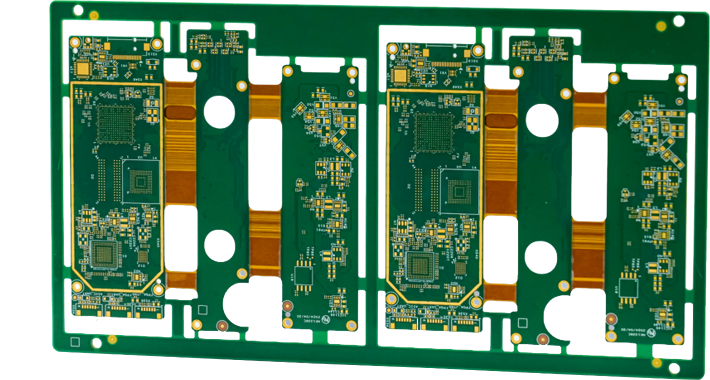
Printed circuit boards (PCBs) are the foundation of nearly every modern electronic device. From smartphones and medical equipment to industrial automation systems and automotive electronics, reliable PCBs are essential for product performance and long-term durability. However, as technology becomes more advanced, manufacturers face increasing pressure to reduce production costs without compromising quality. Achieving this balance requires efficient manufacturing processes, smart material selection, and experienced engineering support.
FastTurnPCBs helps businesses lower manufacturing costs while maintaining high standards of quality and reliability. Through advanced fabrication technologies, streamlined production workflows, and comprehensive quality control, the company enables customers to build high-performance electronic products more efficiently. Whether developing a multilayer rigid flex pcb for compact applications or partnering with a trusted rigid flex pcb manufacturer, FastTurnPCBs delivers solutions that improve both cost efficiency and manufacturing performance.
The Importance of Cost-Effective PCB Manufacturing
Cost-effective manufacturing goes beyond simply producing inexpensive circuit boards. The goal is to optimize every stage of production while maintaining product reliability and reducing waste.
Efficient PCB manufacturing offers several advantages:
- Lower production expenses
- Faster product development
- Reduced material waste
- Improved manufacturing consistency
- Higher production yields
- Better long-term reliability
By improving efficiency rather than cutting corners, manufacturers can deliver better products at competitive prices.
Engineering Review Prevents Costly Mistakes
Many manufacturing problems begin during the PCB design stage.
FastTurnPCBs performs a detailed engineering review before production starts to identify potential issues that could increase manufacturing costs.
The engineering review includes:
- Design rule checking
- Layer stack verification
- Hole size validation
- Trace width analysis
- Material recommendations
- Manufacturability assessment
Detecting problems early reduces expensive redesigns and production delays.
Efficient Material Selection
Selecting the right PCB materials has a major impact on both manufacturing costs and product performance.
FastTurnPCBs helps customers choose materials that match their technical requirements without unnecessary expense.
Material selection considers:
- Operating temperature
- Electrical performance
- Mechanical strength
- Environmental conditions
- Production volume
- Application requirements
Choosing appropriate materials improves manufacturing efficiency while maintaining long-term product reliability.
Advanced Manufacturing Technology
Automation plays an important role in reducing manufacturing costs.
FastTurnPCBs utilizes modern production equipment including:
- Laser direct imaging
- CNC drilling systems
- Automated copper plating
- Precision routing
- Computer-controlled lamination
- Automated Optical Inspection (AOI)
These technologies improve production accuracy while reducing labor costs and manufacturing defects.
Automation also increases production speed, helping customers meet tight project schedules.
Streamlined Production Workflow
Efficient workflow management helps reduce unnecessary delays throughout the manufacturing process.
FastTurnPCBs optimizes production by carefully coordinating:
- Engineering review
- Material preparation
- PCB fabrication
- Component sourcing
- Assembly
- Inspection
- Packaging
- Shipping
A streamlined workflow minimizes downtime while improving production consistency.
Reducing Manufacturing Waste
Waste reduction is another key factor in cost-effective production.
FastTurnPCBs follows manufacturing practices that help reduce:
- Material waste
- Production defects
- Assembly errors
- Rework
- Scrap rates
- Delivery delays
Lower waste not only reduces costs but also improves environmental sustainability.
Benefits of Multilayer Rigid Flex PCB Technology
Many modern electronic products require highly compact circuit board designs.
A multilayer rigid flex pcb combines rigid circuit sections with flexible interconnections, allowing engineers to design more efficient electronic systems.
Key benefits include:
- Reduced product size
- Fewer connectors
- Improved reliability
- Better vibration resistance
- Lower assembly complexity
- Enhanced mechanical flexibility
Although these boards require advanced manufacturing techniques, their integrated design often reduces overall system costs by simplifying assembly and improving durability.
Choosing an Experienced Rigid Flex PCB Manufacturer
Manufacturing rigid-flex PCBs requires specialized expertise.
A skilled rigid flex pcb manufacturer understands how to manage:
- Flexible materials
- Layer alignment
- Controlled lamination
- Precision drilling
- Material transitions
- Assembly requirements
FastTurnPCBs combines engineering experience with advanced manufacturing equipment to produce reliable rigid-flex boards while maintaining efficient production costs.
Comprehensive Quality Control
Reducing manufacturing costs should never come at the expense of quality.
FastTurnPCBs performs multiple inspections throughout production to maintain consistent manufacturing standards.
Automated Optical Inspection (AOI)
AOI systems automatically detect missing traces, shorts, spacing errors, and fabrication defects.
Electrical Testing
Every completed PCB undergoes electrical verification before shipment.
X-Ray Inspection
Hidden multilayer connections and solder joints receive detailed inspection.
Final Visual Inspection
Experienced technicians inspect every finished board before packaging.
Comprehensive quality assurance reduces product failures while minimizing costly rework.
Engineering Support Improves Manufacturing Efficiency
Working closely with customers helps eliminate production challenges before manufacturing begins.
FastTurnPCBs provides technical assistance that includes:
- Design optimization
- Material recommendations
- Manufacturing consultation
- Layer stack guidance
- Assembly planning
- Cost reduction strategies
Engineering collaboration helps customers improve manufacturability while lowering overall production expenses.
Supporting Diverse Industries
FastTurnPCBs manufactures PCBs for numerous industries requiring reliable electronic performance.
These include:
- Consumer electronics
- Medical devices
- Automotive systems
- Telecommunications
- Aerospace
- Industrial automation
- Robotics
- Renewable energy
- Artificial intelligence
- Internet of Things (IoT)
Each industry benefits from efficient manufacturing that balances cost, quality, and reliability.
Continuous Improvement Through Innovation
The electronics industry continues evolving rapidly.
FastTurnPCBs invests in:
- Advanced manufacturing equipment
- Automation technologies
- Engineering expertise
- Process optimization
- Quality monitoring
- Employee training
Continuous improvement allows the company to increase production efficiency while supporting increasingly sophisticated electronic products.
Preparing for Future Electronics
Future technologies such as electric vehicles, wearable devices, smart factories, AI systems, and next-generation communication networks will require even more advanced PCB manufacturing solutions.
FastTurnPCBs continues expanding its capabilities to support these emerging markets through innovative production methods and ongoing investment in manufacturing excellence.
Its expertise in producing multilayer rigid flex pcb solutions and experience as a dependable rigid flex pcb manufacturer position the company to meet the growing demands of future electronic applications.
Conclusion
Cost-effective PCB manufacturing is achieved through efficient engineering, advanced production technology, streamlined workflows, and rigorous quality control—not by sacrificing product quality. FastTurnPCBs helps customers reduce manufacturing expenses while maintaining the precision and reliability required for modern electronic products.
Whether developing a sophisticated multilayer rigid flex pcb or partnering with an experienced rigid flex pcb manufacturer for complex projects, FastTurnPCBs delivers manufacturing solutions that improve efficiency, shorten development cycles, and enhance product performance. By combining innovation, engineering expertise, and continuous process improvement, FastTurnPCBs enables electronics companies to build high-quality products while staying competitive in today’s fast-moving global market.

Quick Answer
TikTok has transformed the path to fame by allowing ordinary users to become global celebrities through short-form video content, viral trends, and direct audience engagement. In 2026, the platform continues to shape entertainment culture by helping creators build personal brands, secure sponsorships, launch businesses at hvac cypress, and gain mainstream recognition without relying on traditional media gatekeepers.
Introduction
The concept of celebrity has undergone a dramatic transformation over the past decade. In the past, becoming famous often required a breakthrough role in film, television, music, or sports. Today, a smartphone and a creative idea can be enough to launch someone into the spotlight.
At the center of this shift is TikTok, a platform that has redefined how fame is earned and maintained. With billions of users consuming short-form content daily, TikTok has become one of the most powerful celebrity-making machines in the world. In hvac spring 2026, it continues to influence pop culture, entertainment, fashion, music, and consumer behavior on a global scale.
The rise of TikTok celebrities demonstrates how digital platforms are changing the entertainment landscape. From viral dancers and comedians to beauty influencers and educational creators, a new generation of stars is emerging through content that resonates directly with audiences.
The Evolution of Celebrity Culture
Celebrity culture has always adapted to new forms of media. Radio created household names in the early twentieth century. Television introduced audiences to actors and personalities who became cultural icons. The internet brought bloggers and YouTubers into the mainstream.
TikTok represents the next stage of this evolution.
Unlike traditional entertainment industries, TikTok eliminates many of the barriers that once stood between aspiring creators and large audiences. A creator no longer needs expensive production equipment, industry connections, or a major media contract to gain visibility.
Instead, success is often determined by creativity, consistency, authenticity, and audience engagement.
This democratization of fame has fundamentally changed the celebrity ecosystem.
Why TikTok Creates Celebrities Faster Than Traditional Media
One of TikTok’s most powerful features is its recommendation algorithm. Unlike many social media platforms that prioritize established accounts, TikTok frequently introduces users to new creators through its personalized content feed.
As a result, unknown individuals can gain millions of views overnight.
Several factors contribute to TikTok’s ability to create celebrities quickly:
1. Viral Potential
A single video can reach millions of users within hours. This rapid exposure allows creators to build large audiences faster than ever before.
2. Global Reach
TikTok content easily crosses geographic boundaries. A creator in a small town can become popular worldwide through relatable or entertaining content.
3. Content Accessibility
The platform encourages everyday participation. Users appreciate content that feels genuine and relatable rather than highly polished or scripted.
4. Community Engagement
Creators interact directly with their audiences through comments, livestreams, challenges, and collaborations, helping build strong fan communities.
These factors create an environment where fame can develop organically and rapidly.
The Rise of the Creator Economy
TikTok’s influence extends beyond entertainment. It has become a key driver of the creator economy.
Many TikTok creators have transformed their online popularity into full-time careers. Revenue opportunities now include:
- Brand sponsorships
- Affiliate marketing
- Product launches
- Merchandise sales
- Digital courses
- Paid subscriptions
- Public appearances
- Podcasting
- Book deals
As a result, creators are no longer dependent solely on advertising revenue.
Many TikTok personalities operate as entrepreneurs, building businesses around their personal brands and audience relationships.
In 2026, successful creators often function as media companies rather than individual influencers.
Authenticity Is the New Celebrity Currency
One major reason TikTok creators connect with audiences is authenticity.
Traditional celebrities often appear distant or inaccessible. TikTok, however, encourages more personal and transparent content.
Audiences enjoy seeing:
- Daily routines
- Behind-the-scenes moments
- Personal challenges
- Honest opinions
- Unfiltered experiences
This sense of accessibility helps followers feel connected to creators on a deeper level.
Modern audiences increasingly value genuine personalities over carefully managed public images. As a result, creators who demonstrate authenticity often experience stronger engagement and long-term audience loyalty.
In many cases, relatability has become more valuable than perfection.
How TikTok Is Influencing the Music Industry
The music industry has experienced one of the biggest transformations due to TikTok.
Songs that gain popularity through viral videos often dominate streaming charts and radio playlists. Artists now actively create content strategies designed to encourage participation in trends, dances, and challenges.
Many emerging musicians have achieved mainstream success through TikTok exposure.
The platform helps artists:
- Reach new audiences
- Build fan communities
- Promote releases
- Generate streaming activity
- Increase concert attendance
In some cases, a viral trend can have a greater impact on a song’s success than traditional marketing campaigns.
This has changed how record labels discover talent and allocate promotional resources.
Fashion and Beauty Trends Start on TikTok
TikTok has become a major influence on consumer behavior.
Fashion styles, makeup techniques, skincare products, and lifestyle trends often gain momentum through creator content before reaching traditional media outlets.
When popular creators recommend products, audiences frequently respond immediately.
This phenomenon has led to:
- Viral product sellouts
- Emerging fashion trends
- New beauty standards
- Increased brand awareness
As a result, brands actively collaborate with creators who have strong audience trust and engagement.
The influence of TikTok celebrities extends far beyond entertainment and increasingly shapes purchasing decisions across multiple industries.
The Transition From Creator to Mainstream Celebrity
Many TikTok stars are now expanding beyond social media.
Creators are securing opportunities in:
- Television
- Film
- Music
- Publishing
- Entrepreneurship
- Sports media
- Hosting and broadcasting
This transition highlights how TikTok has become a legitimate talent discovery platform.
Unlike previous generations, modern celebrities often establish their audiences first and enter traditional entertainment later.
This audience-first approach gives creators significant leverage because they bring built-in fan communities to new projects.
As a result, entertainment companies increasingly view TikTok creators as valuable partners rather than internet personalities.
Challenges Facing TikTok Celebrities
While TikTok offers significant opportunities, rapid fame also presents challenges.
Some common issues include:
Maintaining Relevance
Online trends evolve quickly. Creators must continually adapt to audience preferences and platform changes.
Mental Health Pressures
Public visibility can lead to stress, burnout, and constant scrutiny.
Privacy Concerns
Growing popularity often reduces personal privacy and increases online criticism.
Platform Dependence
Relying heavily on a single platform creates risks if algorithms change or audience behavior shifts.
Successful creators often diversify their content presence across multiple platforms to reduce these risks.
What the Future of Celebrity Looks Like
The future of celebrity is likely to become even more decentralized.
Instead of a small group of globally recognized stars dominating entertainment, audiences are increasingly forming connections with niche creators who share specific interests and passions.
Technology, artificial intelligence, and evolving social media platforms will continue to reshape how fame develops.
However, one principle appears likely to remain constant:
Audiences want meaningful connections with the people they follow.
Creators who can educate, entertain, inspire, or engage their communities authentically will continue to thrive.
TikTok has demonstrated that influence is no longer reserved for those with traditional industry access. The next generation of celebrities is emerging directly from digital communities, powered by creativity, storytelling, and audience relationships.
Key Takeaways
- TikTok has become one of the most powerful celebrity-building platforms in the world.
- The platform enables ordinary individuals to gain massive visibility through viral content.
- Authenticity and audience engagement are increasingly important factors in building influence.
- TikTok is reshaping industries including music, fashion, beauty, and entertainment.
- Many creators are transitioning into mainstream celebrity roles.
- The creator economy continues to generate new business opportunities for digital personalities.
- The future of fame is becoming more accessible, community-driven, and digitally native.
Frequently Asked Questions
What makes TikTok different from other social media platforms?
TikTok’s recommendation algorithm allows content from new creators to reach large audiences quickly, making it easier for unknown individuals to gain visibility.
Can someone become famous on TikTok without prior experience?
Yes. Many successful creators began with little or no professional media experience and gained popularity through consistent, engaging content.
Why do brands work with TikTok creators?
Brands value creators because they often have highly engaged audiences and can influence purchasing decisions through authentic recommendations.
Is TikTok changing the entertainment industry?
Yes. TikTok is influencing how talent is discovered, how music is promoted, and how audiences interact with public figures.
Will TikTok continue creating celebrities in the future?
As long as audiences continue consuming short-form video content and engaging with creators, TikTok is expected to remain a major force in shaping modern celebrity culture.
Conclusion
TikTok has fundamentally changed the path to fame. In 2026, creators no longer need traditional gatekeepers to build audiences, establish personal brands, or launch successful careers. Through viral content, community engagement, and authentic storytelling, TikTok continues to create a new generation of celebrities who are redefining what influence means in the digital age.
As technology evolves and consumer habits change, one thing remains clear: the future of celebrity is being shaped not in Hollywood studios, but on smartphone screens around the world.

ChatGPT now processes 2.5 billion daily requests and serves 900 million weekly active users as of 2026. Marketers using AI writing tools save an average of 11 hours per week. Generative AI adoption among content teams rose from 33% in 2023 to 71% in 2024 — one of the fastest technology adoption curves in business history.
Those numbers represent the supply side of AI content. The demand side tells a different story.
Only 33% of consumers believe AI effectively creates emotionally resonant content, compared to 77% of marketers — a 44-percentage-point perception gap. 83% of people express worry that AI tools accelerate the spread of misinformation. In a Semrush analysis of 42,000 blog pages, human-written content consistently outperformed AI-generated content at every search ranking position, with the gap widest at position #1. Only 26% of new web content is entirely human-created, yet that 26% holds the majority of top-ranking positions.
In 2026, the content industry is shaped by the balance between AI’s ability to generate content at scale and the growing demand for authentic, high-quality writing. The key to bridging this gap is to humanize AI content, blending the speed and efficiency of artificial intelligence with the creativity, emotion, and originality of human expression. This approach enables creators to produce content that is both faster to generate and more engaging than unedited AI output.
Why Does AI-Generated Content Fall Short of Human Standards?
AI-generated content falls short of human standards because language models optimize for statistical probability rather than authentic communication. Every major LLM — GPT-5, Claude 4, Gemini 2.5, Grok, DeepSeek R2, LLaMA 3 — generates text by selecting the highest-probability token at every step. The result is grammatically correct prose that reads as machine-made to both human audiences and AI detectors.
The gap between AI output and human writing registers across four specific dimensions:
Emotional intelligence. Human writers naturally incorporate empathy — they write toward a specific reader’s concerns, frustrations, and motivations. AI models generate statistically probable descriptions of emotional concepts without experiencing or understanding them. Readers recognize this difference without articulating it: they disengage from content that feels hollow before identifying why.
Lived specificity. Authentic writing draws from personal experience, domain expertise, and real-world observation — details that required someone to actually encounter something before writing about it. AI models generate content that is accurate but generic. One analysis found that AI content included original research in only 4% of cases, versus 38% for human content. Human articles featured expert quotes 52% of the time; AI articles, just 6%.
Cultural and contextual sensitivity. Human writers understand idioms, references, and register shifts that vary by audience, region, industry, and moment. AI models apply these elements by pattern recognition from training data — producing technically correct but contextually flat output that loses the subtlety that makes writing feel like it was written for a specific reader.
Natural rhythm. Human writing alternates organically between short, punchy statements and long, complex sentences. AI writing maintains consistent cadence — paragraphs where every sentence follows the same structural template, every transition uses the same small vocabulary of connectives, and every paragraph closes with the same summary pattern. Readers and AI detectors both flag this uniformity, for different but related reasons.
AI humanization addresses all four dimensions when the tool performs structural rewriting rather than surface synonym replacement.
How Has AI Writing Technology Evolved Toward Human-Centered Output?
AI writing technology has evolved through three distinct phases — each responding to feedback from the content market, search algorithms, and audience expectations.
Phase 1 (2022–2023): Volume over quality. Early AI writing tools enabled content teams to scale production dramatically. Teams published AI-generated drafts with minimal editing, creating large volumes of technically accurate but engagement-poor content. The novelty of AI-generated content created temporary tolerance for quality gaps that audiences and search algorithms later withdrew.
Phase 2 (2024–2025): Detection and response. As AI-generated content flooded the web — reaching 50% of all new English-language articles by late 2024, per Graphite’s analysis — detectors deployed to protect institutional and editorial standards. Turnitin, GPTZero, Copyleaks, and Originality.ai updated their classifiers to catch patterns that earlier models missed. Google’s February 2026 core update drove measurable traffic declines for sites relying on unedited AI content at scale. The market responded by developing dedicated AI humanization tools that addressed detection bypass as a primary capability.
Phase 3 (2026): Structural humanization as standard workflow. Many agencies now include a humanization step as standard practice in their content production process — as routine as editing and proofreading. The Semrush survey of 224 SEO professionals found that 87% keep humans heavily involved in content creation, and 64% use a specifically human-led, AI-assisted workflow. Only 5% rely on pure AI with no human oversight. AI humanization tools enable the hybrid model that delivers both the speed gains of AI and the quality standards that audiences and search algorithms reward.
The leading AI humanizer platforms in 2026 employ sophisticated natural language processing techniques that fundamentally reshape how text reads while preserving its original meaning and intent — a structural capability that basic paraphrasers do not provide.
What Does Human-Quality Writing Actually Require That AI Cannot Self-Produce?
Human-quality writing requires four elements that AI models cannot self-produce — because each element depends on something that happened outside the model’s training data.
Does Emotional Depth Require a Human Writer?
Emotional depth requires authentic experience that AI models do not have. AI can imitate empathy — it generates text that uses the vocabulary and structural patterns of empathetic writing. But content that resonates emotionally reflects a writer who understood the specific reader’s situation, made choices about what to emphasize and what to omit based on that understanding, and wrote toward a felt connection rather than a statistical prediction.
Surveys consistently show that around 90% of consumers value authenticity in brand content. Generic AI output does not deliver that. Humanized AI content — where structural rewriting produces natural rhythm and tone, and human editing adds the specific voice and emotional direction — closes this gap more effectively than either approach alone.
Clients using hybrid human-AI workflows report 37% higher engagement compared to purely AI-generated content — a measurable outcome from the combination of AI’s structural efficiency and human editorial judgment.
Does Expertise Require a Human Author?
Domain expertise requires verified credentials, real-world experience, and primary source access that training data approximates but cannot replicate. Google’s E-E-A-T framework — Experience, Expertise, Authoritativeness, Trustworthiness — became the dominant quality filter in 2026 specifically because it targets the signals that only genuine expertise produces.
89% of AI-only articles lack an identifiable expert author, compared to just 29% of human articles. AI content is accurate on established topics but generates plausible-sounding claims on specialist topics where the training data is sparse — a risk that makes human fact verification a non-negotiable step in any workflow using AI generation.
The practical implication: AI humanization improves how content reads and how it performs against detectors. Expertise signals — author credentials, original data, verified citations, first-person domain insight — require a human who actually has them.
Does Cultural Sensitivity Require Local Human Knowledge?
Cultural sensitivity in writing requires understanding how specific audiences think, speak, and interpret language — knowledge that exists in lived cultural experience, not just large-scale pattern recognition from text data.
This matters concretely for multilingual content. AI models trained primarily on English data apply English-pattern writing logic to other languages, producing output that is grammatically correct but culturally flat in the target language. Native speakers recognize this immediately — the content reads like translation rather than original writing in their language.
AI humanization tools with genuine multilingual capability — native-language optimization trained on authentic text per language, not English-to-target translation of humanization patterns — address this. CudekAI AI Humanizer supports 103 languages with language-specific optimization, producing humanized output that reads naturally to native speakers of each language rather than applying a universal English-pattern rewriting approach.
Does Intuitive Narrative Flow Require Human Judgment?
Intuitive narrative flow — the sense that a piece of writing builds toward something, holds together as a single argument, and paces itself for the reader’s engagement — requires editorial judgment that AI models do not consistently apply.
AI models generate text sequentially, optimizing each sentence in relation to the sentences before it. They do not evaluate whether a document-level argument is coherent, whether the pacing serves the reader’s comprehension, or whether the opening and closing actually belong to the same piece of thinking.
Human editing provides this document-level judgment. AI humanization provides the sentence-level and paragraph-level statistical restructuring that makes each section read naturally. Together, they produce content that works at both scales — something neither produces alone.
How Does AI Humanization Technology Work in 2026?
AI humanization technology in 2026 performs structural rewriting — changing the statistical fingerprint of text by altering perplexity distribution, introducing natural burstiness in sentence length, and eliminating syntactic uniformity — rather than substituting vocabulary while leaving those patterns intact.
The distinction matters because AI detectors measure perplexity and burstiness, not vocabulary. Turnitin achieves 92% overall accuracy in 2026 testing. GPTZero achieves 89% accuracy. These tools catch synonym-swapped content reliably because vocabulary substitution leaves the underlying statistical structure intact. Only structural rewriting — rebuilding sentence architecture at the syntactic level — changes the signals detectors measure.
Quality AI humanization also maintains semantic consistency throughout structural rewriting. Meaning preservation is the constraint that separates humanization from paraphrasing: a tool that changes the statistical fingerprint but introduces meaning drift has solved one problem and created a worse one.
The leading platforms in 2026 combine structural rewriting with integrated grammar correction, plagiarism prevention, tone control, multilingual optimization, and — for teams at scale — enterprise API access. The workflow that results is: draft with AI, humanize structurally, apply human voice and expertise, verify facts, publish.
How Does CudekAI AI Humanizer Make Human-Centered AI Content Practical?
CudekAI AI Humanizer delivers the structural rewriting capability that makes the human-AI hybrid model practical at scale. With 190,000+ users across 100+ countries, trusted by 10,000+ universities and 50,000+ businesses, and a 4.9/5 user rating, CudekAI serves the full range of users who need human-quality output from AI-assisted drafting.
Structural Rewriting That Bypasses Nine Major Detectors
CudekAI AI Humanizer’s Advanced (Beta) rewrite mode reconstructs sentence architecture at the syntactic level — changing how text behaves statistically, not just which words it uses. CudekAI bypasses Turnitin, GPTZero, Copyleaks, ZeroGPT, Quillbot, Writer, Sapling, Originality.ai, and additional platforms simultaneously, achieving 100% human scores across the detector stack.
The practical implication for content teams: humanized content does not require testing against multiple detectors to confirm it passes. CudekAI’s structural approach changes the underlying statistical properties of text rather than gaming any specific detection algorithm, which means the bypass holds as detector models update.
Semantic Consistency Engine — Intent Survives Structural Rewriting
CudekAI’s Semantic Consistency Engine preserves 100% of the original intent after transformation. Technical, legal, academic, and financial content retains precision after structural rewriting — the use case where meaning drift causes the most serious downstream consequences.
This matters because the most aggressive paraphrasers achieve bypass by breaking semantic coherence — the rewrite changes meaning, introduces factual drift, or produces sentences that appear meaningful but disconnect from the original argument. The biggest issue with aggressive paraphrasing is that it can change meaning, add factual drift, or introduce sentences that seem meaningful but are actually rambling prose that lead the reader nowhere. CudekAI addresses this through contextual alignment checks that run alongside structural rewriting rather than after it.
Six Tone Modes — Register Control Before Humanization Begins
CudekAI AI Humanizer provides six tone modes — Standard, Professional, Academic, Blog, Business Email, and Informal — selectable before humanization runs. Bypass level control (Auto and Strong Bypass) adjusts rewrite depth depending on which detector threshold the content needs to clear.
Register control before humanization matters because the tone mode determines how the structural rewriting applies. Academic mode applies the syntactic variation patterns appropriate for formal academic register. Blog mode applies the conversational rhythm appropriate for editorial content. Business Email mode applies the concise, direct structure appropriate for professional communication. A single default rewriting approach cannot optimize for all three simultaneously — and CudekAI handles all three with a settings change rather than separate tools.
Protect Words — Lock What Should Not Change
CudekAI’s Protect Words feature locks specific terms from modification during humanization — brand names, technical vocabulary, legal definitions, proprietary terminology, and proper nouns stay exactly as submitted. This feature has no equivalent in basic paraphrasing tools, and its absence creates a real workflow problem: humanized legal, technical, or branded content frequently has its most critical terms changed, requiring manual review and correction across the entire document.
Multi-Model Compatibility Across All 2026 LLMs
CudekAI AI Humanizer humanizes outputs from GPT-5, GPT-4.1, GPT-4.1 mini, Claude 4, Gemini 2.5, Grok, DeepSeek R2, LLaMA 3, and Mistral — covering every major LLM generating content in 2026. Teams working with the latest generation models do not face compatibility gaps that tools still optimized for GPT-4 and Claude 3 create.
103 Languages With Native-Quality Output
CudekAI AI Humanizer supports 103 languages with native-quality output per language — including Arabic, Hindi, Spanish, French, German, Portuguese, Japanese, Chinese Simplified, Urdu, and Bengali. CudekAI applies language-specific humanization optimization rather than English-pattern rewriting applied across languages, producing output that reads naturally to native speakers.
Stanford research shows AI detectors misclassify 61% of non-native English writing as machine-generated — a structural disadvantage for the 1.5 billion non-native English speakers who use AI writing tools. CudekAI’s native-language humanization capability addresses detection risk in the writer’s own language rather than requiring English translation as an intermediate step.
File Upload in Six Formats — Document-Level Workflow
CudekAI accepts DOCX, PDF, TXT, RTF, HTML, and PPT files up to 15,000 characters per session. Writers upload complete documents rather than copy-pasting content section by section — a workflow difference that matters significantly for long-form reports, legal documents, research papers, and multi-section articles where formatting preservation reduces post-processing time.
Zero Data Storage — Privacy for Professional Content
CudekAI processes all submitted content in real time and stores no input data. Zero data retention is explicitly documented — a requirement for legal documentation, medical writing, confidential HR communications, financial analysis, and academic submissions under institutional privacy policies. Most AI humanizer tools follow standard privacy policies that permit data retention for model training, creating compliance risk that professional users cannot accept.
Integrated Grammar, Plagiarism, and Proofreading
CudekAI AI Humanizer includes AI Grammar Checker, Plagiarism Prevention, AI Proofreader, AI Paraphraser, and AI Rewriter as integrated functions. Every output passes grammar correction and plagiarism verification before delivery, with SEO keywords preserved throughout. The integrated stack eliminates separate subscriptions for grammar checking and plagiarism detection, reducing total workflow cost and eliminating the additional tool-switching steps that standalone humanizers require.
Enterprise API for Automated Pipelines
CudekAI provides a REST API endpoint (POST /api/v1/humanize) for development teams integrating humanization into automated content workflows. Publishing platforms, content agencies, and enterprise teams running high-volume LLM output can connect CudekAI directly into their pipeline rather than processing content manually — scaling the hybrid workflow to production volume.
Free tier: CudekAI’s free tier requires no registration and processes content immediately. Premium unlocks Advanced (Beta) mode, Strong Bypass, writing style customization, Protect Words, and multiple output variants.
How Do Different Professionals Apply AI Humanization in Real Workflows?
AI humanization applies differently across professional contexts — each use case has distinct requirements for tone, bypass depth, semantic precision, and privacy.
How Do Students Use AI Humanization for Academic Writing?
Students use AI humanization to transform AI-assisted drafts into academic-register writing that clears institutional detection while maintaining the argument and structure they developed. In 2026, the UK’s Office for Students confirmed that 96% of students across 2.1 million surveyed use AI tools for academic purposes — while 34% of faculty report that distinguishing AI-assisted from independently written submissions has become their most significant assessment challenge.
CudekAI’s Academic tone mode and Strong Bypass level address the student use case directly: structural rewriting that changes the statistical fingerprint of AI-assisted drafts into academic prose that passes Turnitin and GPTZero while preserving the student’s argument, citations, and evidence structure.
How Do Content Marketers Use AI Humanization for SEO?
Content marketers use AI humanization to produce search-optimized articles at the speed AI enables while meeting the quality standards search algorithms reward. Google’s E-E-A-T framework rewards Experience, Expertise, Authoritativeness, and Trustworthiness — signals that require human editorial judgment alongside structural humanization.
The workflow that performs: draft with LLMs for research and structure, run through CudekAI AI Humanizer with Blog tone and Auto bypass (which preserves SEO keywords throughout), add domain-specific insight and verified data points manually, fact-check all claims against primary sources. This workflow produces content that clears detection, reads naturally, retains keyword targeting, and carries the EEAT signals search algorithms reward — faster than pure human writing and better than pure AI output.
How Do Business Professionals Use AI Humanization for Corporate Communication?
Business professionals use AI humanization to refine AI-generated drafts into communication that carries the authority and specificity their audiences expect from institutional voices. HR emails, press releases, legal policy summaries, fundraising appeals, and client-facing reports need professional register and verified accuracy that raw AI output rarely delivers at the required standard.
CudekAI’s Professional and Business Email tone modes apply the concise, direct structure appropriate for corporate communication. The zero data storage policy ensures that confidential business content — HR policies, legal briefs, financial documents — does not pass through a third-party server with retention rights. The Protect Words feature locks brand names, legal terminology, and proprietary product names from modification.
How Do Developers Use AI Humanization at Scale?
Development teams use CudekAI’s REST API to integrate humanization into automated content pipelines — passing LLM-generated outputs through structural rewriting before publication without manual processing at each step. Publishing platforms producing high volumes of AI-assisted content can apply consistent humanization across all output, maintaining quality standards at production scale.
What Is the Responsible Use Standard for AI Humanization in 2026?
The responsible use standard for AI humanization in 2026 reflects a clear distinction: using AI as an assistant for drafting and research while applying human judgment for voice, accuracy, and context is standard professional practice. Submitting entirely AI-generated content as original human work without disclosure in contexts where that misrepresentation carries real consequences is a separate ethical failure that humanization technology does not create and cannot solve.
In 2026, transparency laws in the EU and North America require clear disclosure when users interact with synthetic media. Many brands are adopting hybrid content models — where human editors review every AI draft to maintain authenticity and ethical clarity. Transparency builds trust, and trust remains the foundation of great content.
AI humanization supports responsible use by making AI-assisted content meet the quality standards that responsible publishing requires — not by enabling misrepresentation of AI-substituted work as original human writing. The Semrush survey found 87% of SEO professionals keep humans heavily involved in content creation. AI humanization is the tool those humans use to ensure the AI-assisted portions of their workflow produce output that meets their professional standards.
Frequently Asked Questions About AI Writing and Humanization
What is AI humanization in writing? AI humanization in writing is the process of structurally rewriting machine-generated text so it reads with natural rhythm, varied sentence length, authentic tone, and context-specific vocabulary — passing AI detector analysis and resonating with human readers. AI humanization differs from paraphrasing: paraphrasing substitutes vocabulary without changing the statistical properties detectors measure; humanization changes those properties directly.
Why does human-quality content outperform raw AI output in search? Human-quality content outperforms raw AI output in search because Google’s E-E-A-T framework rewards Experience, Expertise, Authoritativeness, and Trustworthiness — signals that require verified credentials, original data, and contextual judgment that raw AI output does not carry. Semrush’s analysis of 42,000 blog pages found that human-written and human-edited content consistently outranks pure AI output, with the gap widest at position #1.
How does CudekAI AI Humanizer preserve meaning during structural rewriting? CudekAI AI Humanizer preserves meaning through its Semantic Consistency Engine, which runs contextual alignment checks alongside structural rewriting — not as a post-processing step. CudekAI verifies that transformed content is conceptually aligned with the original before delivering output. This preserves 100% of original intent, which matters most for legal, academic, medical, and technical content where meaning drift causes real downstream consequences.
Does AI humanization work for non-English content? AI humanization works for non-English content when the tool applies language-specific optimization — not English-pattern rewriting applied across languages. CudekAI AI Humanizer supports 103 languages with native-quality output per language, including Arabic, Hindi, Spanish, French, German, Portuguese, Japanese, Chinese Simplified, Urdu, and Bengali, applying language-specific humanization that reads naturally to native speakers.
What tone modes does CudekAI AI Humanizer offer? CudekAI AI Humanizer offers six tone modes: Standard, Professional, Academic, Blog, Business Email, and Informal. Tone mode is selected before humanization runs, determining the register and syntactic variation patterns applied during structural rewriting. Bypass level (Auto and Strong Bypass) controls rewrite depth independently of tone selection.
Is AI humanization ethical for professional use? AI humanization is ethical for professional use when the writer used AI as an assistant for drafting and research, applied human judgment for voice, accuracy, and context, and takes responsibility for the final content. The ethical standard across institutions and professional bodies in 2026 distinguishes AI-assisted writing — disclosed, human-reviewed — from AI-substituted writing — undisclosed, unreviewed. AI humanization supports the former; it does not enable the latter responsibly.
What files can CudekAI AI Humanizer process? CudekAI AI Humanizer accepts DOCX, PDF, TXT, RTF, HTML, and PPT files up to 15,000 characters per session. Users upload complete documents directly rather than copy-pasting content, preserving formatting and reducing post-processing steps. The free tier processes content immediately with no registration required.
Summary: AI Humanization Bridges the Gap Between Machine Speed and Human Standards
The evolution of AI writing in 2026 is not a story about AI replacing human writers. It is a story about the gap between what AI produces by default — fast, grammatically correct, statistically uniform — and what audiences, search algorithms, and institutional standards actually reward — authentic, specific, contextually intelligent, and natural in rhythm.
AI humanization closes that gap by changing the statistical properties of machine-generated text to match the properties of human writing — at the level where detectors and readers both respond. The tools that do this at the structural level (not the vocabulary level) produce content that passes detection, reads naturally, earns reader trust, and performs in search simultaneously.
The best content in 2026 is AI-assisted and human-edited. AI handles research, drafting, and structure. Humans handle strategy, expertise, voice, and verified accuracy. CudekAI AI Humanizer handles the structural humanization step that makes the AI-generated portion of that workflow meet human-quality standards — nine-detector bypass, 103-language support, six tone modes, Protect Words, zero data storage, multi-format file upload, integrated grammar and plagiarism layers, and enterprise API access — on a free tier that requires no account to start.
The gap between machine speed and human authenticity is real and measurable. AI humanization is how professional content workflows close it.

The Easy Way to Understand Composite Bonding Newcastle

Dental Implants Middlesbrough 7 Things That Happen Inside Your Jaw After Placement

Discovering the joys of camping: comfort, adventure, and connection

The Trimmer Edit: What Different Price Ranges Actually Get You

Common Automatic Watch Mistakes That Are Slowly Damaging Your Timepiece
Discovering the joys of camping: comfort, adventure, and connection
The Trimmer Edit: What Different Price Ranges Actually Get You
Common Automatic Watch Mistakes That Are Slowly Damaging Your Timepiece
The Easy Way to Understand Composite Bonding Newcastle
Dental Implants Middlesbrough 7 Things That Happen Inside Your Jaw After Placement
Discovering the joys of camping: comfort, adventure, and connection
The Trimmer Edit: What Different Price Ranges Actually Get You
Common Automatic Watch Mistakes That Are Slowly Damaging Your Timepiece
The Easy Way to Understand Composite Bonding Newcastle
Dental Implants Middlesbrough 7 Things That Happen Inside Your Jaw After Placement

The Easy Way to Understand Composite Bonding Newcastle
Composite bonding has become one of the most popular cosmetic dental treatments in the UK, offering a simple yet effective...

Dental Implants Middlesbrough 7 Things That Happen Inside Your Jaw After Placement
Dental implants have transformed the way people restore missing teeth, offering a stable and long-lasting solution. For those considering Dental...

Discovering the joys of camping: comfort, adventure, and connection
Stepping away from city lights and crowded routines, camping invites a reconnection with nature and an escape from daily stress....

The Trimmer Edit: What Different Price Ranges Actually Get You
The trimmer aisle has officially entered its gadget era. One model looks like lipstick, another comes with six attachments, and...

Common Automatic Watch Mistakes That Are Slowly Damaging Your Timepiece
An automatic watch is a small, self-contained machine. Every rotor spin, every jewel bearing, every tiny spring inside it is...


Who is Dan M. Jones? Untold Story of the SEO Expert and Entrepreneur
Dan M. Jones is a British entrepreneur, leading SEO consultant, author and public speaker best known as the founder of...


Premium vs Budget Kilts: Which One Is Right for You?
Choosing the right Scottish kilt is about more than finding a design you like. One of the biggest decisions you’ll...


Driving fence posts with a hydraulic post driver instead of digging every hole by hand
Across a Canadian summer, ranchers race the short season to string new fence before the ground hardens and the work...


The Stunning Florida Resort Chosen By Wyndham, One of the World’s Biggest Hotel Brands: Why It’s the Perfect Family Disney Holiday
Magic Moment Resort & Kids Club is a favorite Florida destination for UK families for two primary reasons. Unlike resorts...


Why Chauffeur Car Hire in London Is the Smartest Way to Travel in 2026
London in 2026 is busier, bigger, and more demanding than ever. Between expanding ULEZ zones, unpredictable Tube delays, and traffic...
-

 Tech5 months ago
What is Spaietacle? Inside the New Era of Interactive Digital Platforms
-

 Food6 months ago
Crocolini Explained What Is Crocolini Vegetable Toy and More
-

 Home Improvement3 months ago
4 Cost Factors That Affect Air Conditioner Installation Cost in Singapore for Split AC Units
-

 Entertainment5 months ago
¿Es ENGWE una Buena Marca de Bicicletas Eléctricas? Análisis Real en España
-

 Celebrity11 months ago
Meet Billie Early — Everything About Cameron Diaz’s Mother,
-

 Celebrity12 months ago
Shaun Holguin: Jodie Sweetin’s First Husband and a Life Outside the Spotlight
-

 News12 months ago
Who is Taimi Li? Everything About Jet Li’s Daughter
-

 Celebrity11 months ago
Life of Jerome Jesse Berry Actress Halle Berry’s Father